

Know what you have. Know where it is. Get it where it's needed.

Ready every day. Prepared when it matters.

iCAM is web-based inventory, asset and resource management for the agencies that respond. Track supplies, equipment and grant-funded purchases every day, across every facility. When an emergency hits, the same system shows what you have, where it is and how long it will last.

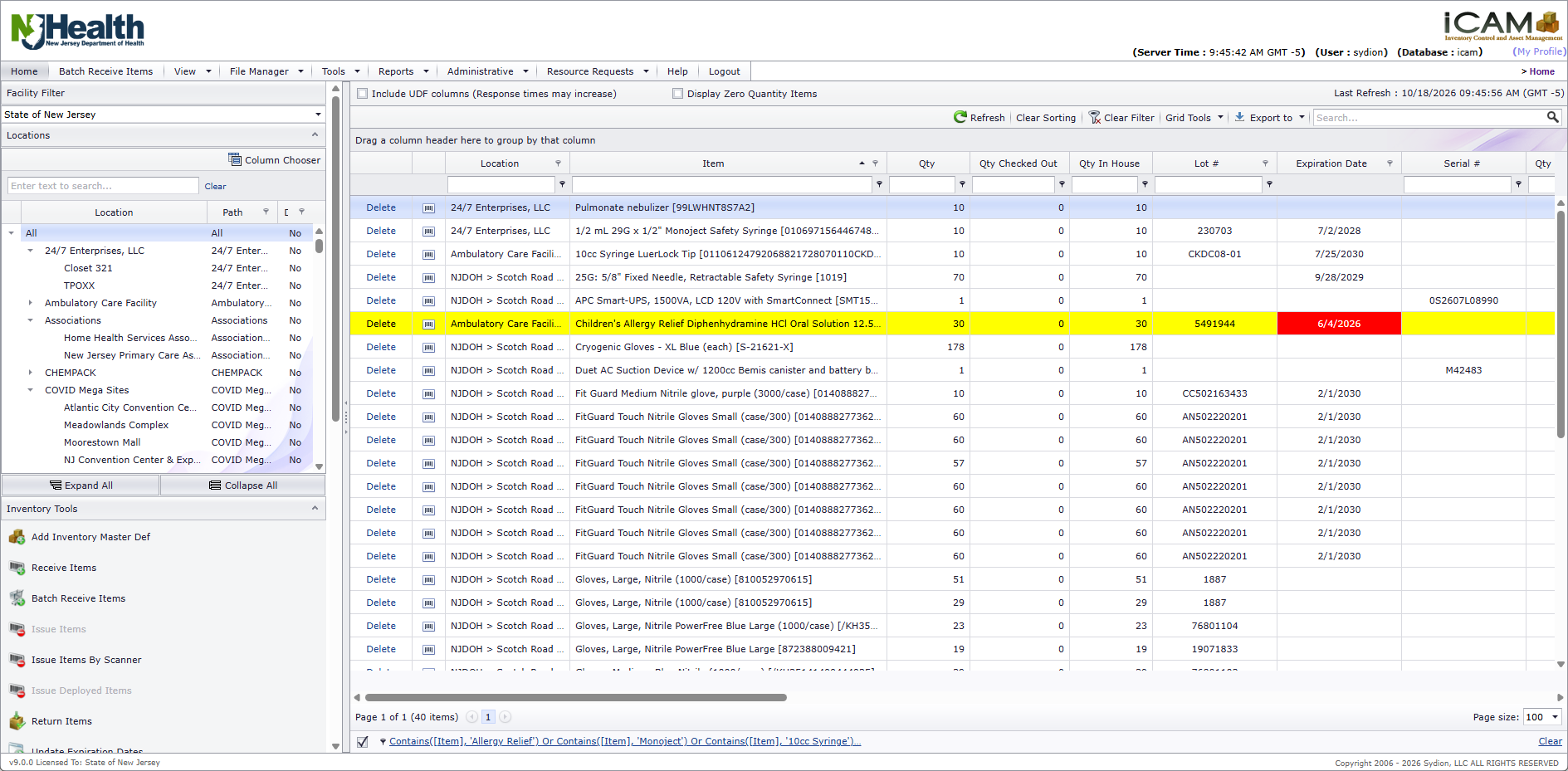
The iCAM home screen: facilities and storage locations on the left with inventory tools below, and the inventory grid with lots, expiration dates and serial numbers side by side. Expired stock is flagged automatically. Drag the image to explore it. View full size: The iCAM home screen

Trusted from county health departments to statewide emergency programs.

agencies served
38
states
16
statewide programs
7
years serving emergency response
20+

Built for the agencies that respond

A state program can run iCAM centrally, with counties, regions and partner agencies joining as facilities. They request supplies from the state and track their own stock in the same system.

  • Public Health
  • Emergency Management
  • EMS
  • Fire
  • Hospitals
  • Law Enforcement
  • Response Teams

Including MRC, DMAT, USAR, HazMat, coroners and state medical response teams.

How iCAM works

Every item follows the same path, and every step leaves a record.

  1. Receive One item or a full shipment at once
  2. Store & Track Every facility, location and shelf
  3. Request Users request the supplies they need
  4. Fulfill Approve, pick and ship, in stages if needed
  5. Deploy / Return Out to the field, back to the shelf
  6. Report Live balances and full history

One system, every day and every emergency

The records you keep for daily operations become your situational picture when it matters most.

Emergency Provisioning

See how long your supplies will last at normal and at peak demand. iCAM projects daily use forward against what you have on hand and shows the days of supply for each item, so you can plan reorders to reach your target days of coverage before you run short.

Scheduled email reports keep the team ahead of expirations, low stock, overdue returns, maintenance and asset tracking dates.

Emergency Provisioning: daily use projected forward, with on-hand stock and days of supply. Drag the image to explore it. View full size: The Emergency Provisioning screen: for each item, daily use, projected need for the next 7, 14, 21 and 28 days, quantity on hand and days of supply

More about Emergency Provisioning

Resource Requests

Authorized users and partner agencies submit requests online for review and approval. Fulfill them line by line, in stages, or by drop-ship straight from the supplier.

Pick tickets, shipping and receipt confirmation keep every request accountable from request to delivery.

  1. Request

    Authorized users and partner agencies submit requests online.

  2. Review

    Requests are reviewed and approved or denied, line by line.

  3. Fulfill

    Pick and ship all at once or in stages, or drop-ship from the supplier.

  4. Confirm

    The requester confirms receipt, with email updates along the way.

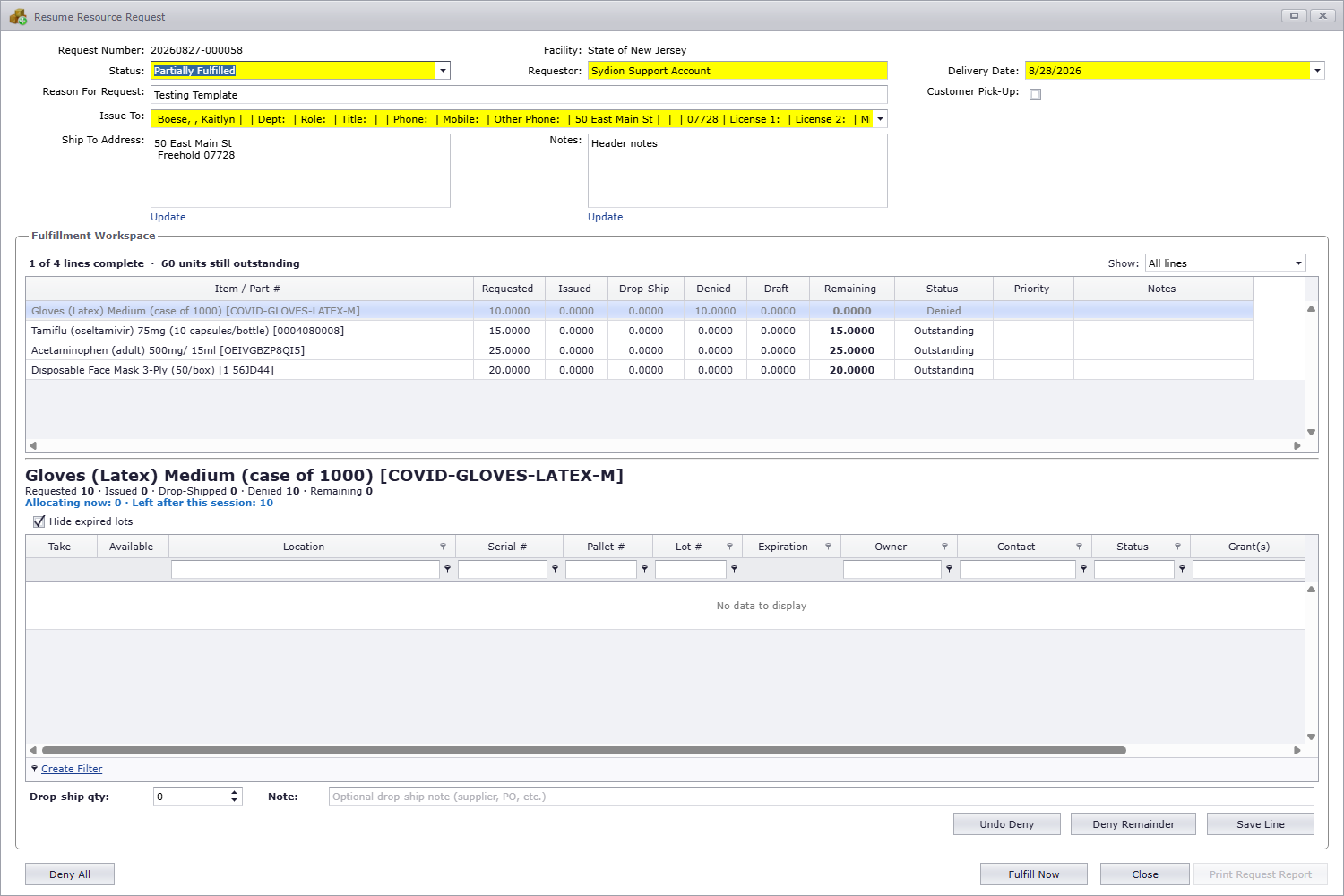
Working a resource request: each line shows what was requested, issued, drop-shipped, denied and still outstanding, and you fulfill from available lots one line at a time. Drag the image to explore it. View full size: The iCAM Resume Resource Request window

More about Resource Requests

Events & Deployments

From emergency shelters and public health clinics to training exercises and incident response, iCAM helps you organize supplies by event, assign responsibility, track what is deployed and used, and account for what comes back.

  • Organize multiple deployments under an event or incident.
  • Reserve inventory for operational needs without losing visibility.
  • Assign responsibility for deployed supplies.
  • Issue, move and return inventory while maintaining accountability.
  • Keep deployment tickets and a searchable transaction history.
  1. Set up

    Create an event, such as a shelter or a clinic, with one or more deployments under it.

  2. Deploy

    Set stock aside for a deployment and, where needed, assign it to the person responsible.

  3. Use

    Issue supplies from the deployment, or move or transfer it, as the work goes on.

  4. Return

    Release what is left back to everyday inventory, on a return ticket.

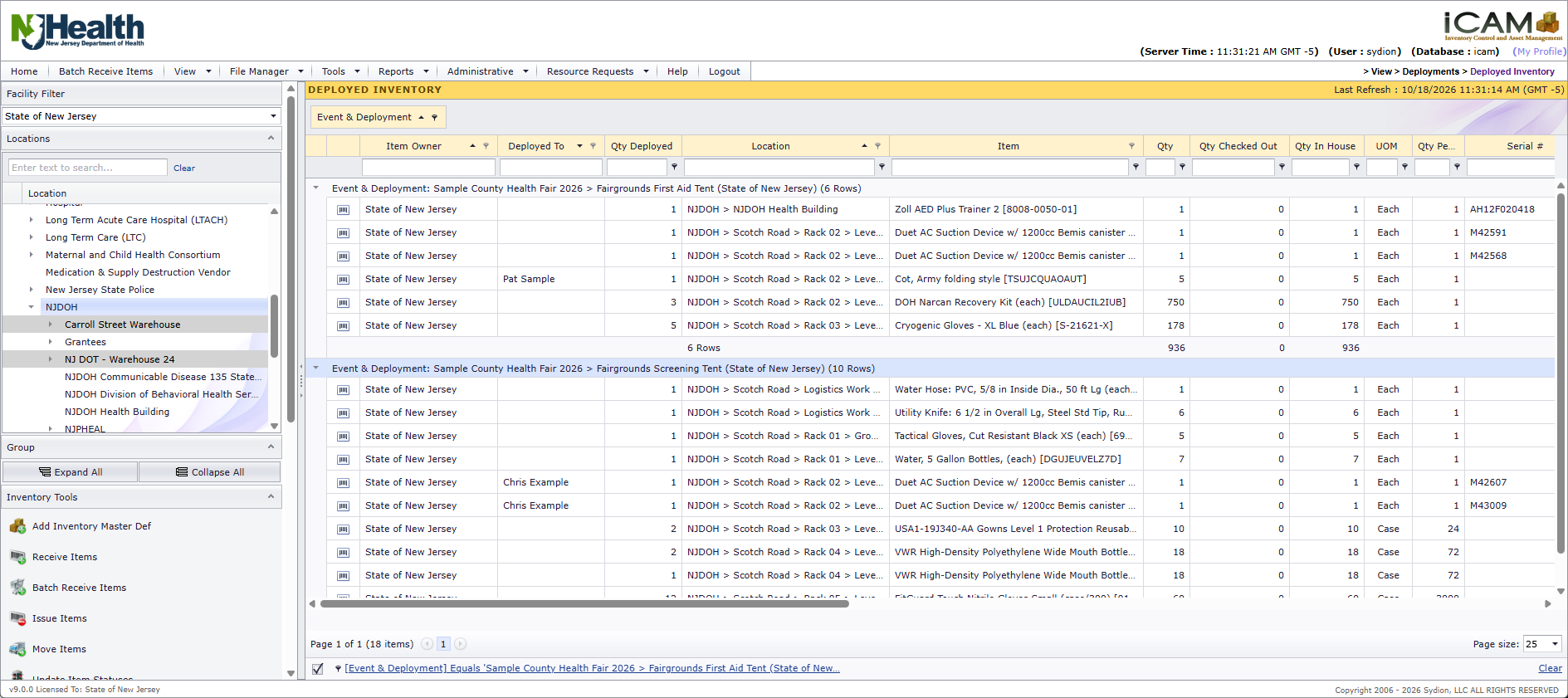
Track equipment and supplies assigned to events, see deployed quantities and responsible personnel, and maintain visibility into inventory throughout the deployment. Drag the image to explore it. View full size: The iCAM Deployed Inventory screen, marked by an amber Deployed Inventory band

More about Events & Deployments

Inventory & Tracking

Know what's on every shelf, and what's about to expire.

  • Supplies, equipment and assets across every facility and shelf
  • Serial, lot and expiration tracking, with expired stock flagged automatically
  • Barcode and QR labels for faster, more accurate daily work

Equipment Check‑Out & Returns

Lend equipment out and know when it comes back.

  • Check out to people, teams or partner agencies, with a return date
  • Overdue returns flagged, with an optional email alert
  • Scan to check out; check in all or part, on a printed ticket

Maintenance & Readiness

Keep critical equipment serviced and ready.

  • A service history for each serialized piece of equipment
  • Dates, costs, who did the work, and service documents
  • Coming-due and overdue lists, reports and email alerts

Accountability & Control

Show where everything went, and control who can do what.

  • Full history of every issue, move, transfer and return
  • Grant-funded purchases with remaining balances
  • Role-based permissions, single sign-on and two-factor sign-in

Own it. Don't rent it.

Buy iCAM once with a one-time perpetual license. It's not a subscription, and the license doesn't expire.

  • First year of maintenance and support included.
  • Optional annual maintenance and support from year two, covering support, updates, new versions and training.
  • No per-user fees, and one complete product with no feature tiers or add-on modules.
  • Add facility licenses as you grow, from a single agency to a statewide program.
  • You own your data, wherever iCAM runs.

Personal support from day one

Every iCAM program starts with hands-on help from Sydion, and that help continues for as long as you keep annual maintenance.

On-site services are available by arrangement.

Support and services
  • Implementation

    We work with your team to configure iCAM around your organization's inventory, locations, users, and operational needs. Initial training and implementation assistance help you get started with confidence.

  • Data imports

    Bring your existing inventory and locations into iCAM from spreadsheets, so you start with real data.

  • Training

    Training for administrators and everyday users, plus more than 25 user manuals built into iCAM.

  • Remote assistance

    When a question comes up, you reach the Sydion team by phone or email and we help you remotely.

See iCAM in action. Request a demo.

A live walkthrough of iCAM, shaped around how your agency stores, requests and deploys supplies.